Average Ratings 0 Ratings
Average Ratings 0 Ratings
Similar Products
-
SenseIPsenseIP streamlines the patenting process by providing a complete AI-driven solution for inventors. The platform supports everything from researching prior art and drafting patents to filing and managing patents, all without requiring legal expertise. With senseIP, users can access advanced AI tools that accelerate the patent process, offering accurate results at a fraction of the cost of traditional patent law services. The platform is trained on over 100 million patent applications globally, ensuring precise and high-quality outcomes for both startups and individual inventors.
-
DocmosisDocmosis is a self-hosted or SaaS template-based document generation solution. Integrate with custom-built software applications or popular third-party apps using the API. Create templates using MS Word or LibreOffice. Add plain-text placeholders to control: the insertion of text/images/tables; conditionally add/remove any content; perform calculations; loop over repeating data; format data/numbers and much more. Integrate with: Custom software built using Java, C#, Python, PHP, Ruby and more via a REST API; Low-code and no-code platforms like Appian, Bubble, Mendix, Outsystems; Third-party form builders or apps that can perform a webhook such as FormAssembly or Salesforce. Used by customers in Finance, Health, Legal, Education, Government, HR, Insurance, Logistics, and Manufacturing to generate customized letters invoices, proposals, contracts, statements, reports and more.
-
Adobe AcrobatAdobe Acrobat is an all-in-one PDF productivity and e-signature platform and one of the leading enterprise document platforms that scales for global teams — designed to simplify document creation, editing, collaboration, and protection. Users can edit text and images directly within PDFs, reorganize pages, and compare file versions to quickly identify changes. The software enables fast conversion between PDFs and common file formats such as Microsoft Word, Excel, PowerPoint, and image files. Integrated e-signature capabilities allow businesses to collect legally binding signatures and track responses securely. With Acrobat Studio, Adobe Acrobat expands beyond core PDF and e‑signature tasks into an AI‑powered workspace for document insight, content creation, and collaboration.Acrobat AI Assistant adds intelligent document support by summarizing content, generating insights, and answering contextual questions with cited references. PDF Spaces creates a collaborative workspace where teams can centralize files, comments, and AI-driven guidance. Built-in protection tools safeguard documents with encryption, permissions, and redaction features. Mobile apps such as Acrobat Reader and Adobe Scan ensure access and editing capabilities from anywhere. Designed for individuals, students, and enterprises, Adobe Acrobat helps reduce document processing time and improve overall productivity.
-
ConcordConcord Horizon is an AI native contract platform built from a complete rewrite of Concord’s technology, applying ten years of experience to a modern architecture for faster and more accurate contract work. The redesigned interface offers light and dark mode, collapsible navigation, full screen focus, custom columns, advanced filtering, and consistent tables across modules. AI Copilot supports natural language questions, contract summaries, key point extraction, and fast portfolio insights, while AI Search adds lexical and semantic search with improved performance and multi actions on results. MCP brings contract intelligence into AI tools like ChatGPT and Claude for summaries, tables, or automated monitoring. Concord applies a strict zero data retention policy with AI partners and never uses customer data to train AI models .
-
Digital WarRoomDWR eDiscovery allows legal professionals to review, process, and produce documents that could be relevant to litigation. Our Software and hosted Subscriptions offers a wide range of document review tools, including AI search, keyword search, keyword highlight, metadata filtering and marking documents. It also has privilege log, redactions and analysis tools to help users better understand their document corpus. These features can all be done by the user themselves, so they can do the standard eDiscovery tasks without consulting. DWR eDiscovery offers subscriptions to both hosted and on-prem eDiscovery. DWR Pro desktop software can be downloaded to your computer or server. DWR Pro costs $1995per concurrent use license/year. Cloud subscriptions are charged per-GB for hosting and there are no hidden fees. The entry-level Single Matter subscription costs $10/GB/Month and has a minimum of $250 per month. Private clouds allow multiple matters and multiple users for no more than $4/GB/month moving quickly to $1/GB/month.
-
optivalue.aiQuestionnaires, audits, and RFPs consume a significant amount of your experts' time. Turn this administrative burden into an engine to win. Optivalue.ai reduces response times by up to 90% by automating information discovery and response drafting, allowing your experts to focus on the high-impact personalization that wins bids. Here's how it works: Understanding: Connected to your systems, it acts as an expert librarian. It reads and understands your entire knowledge base to know precisely where the best information is for any question. Submission: You submit a questionnaire to it. Response: In minutes, it generates a complete draft response using the most relevant excerpts from your own documents. Every answer becomes a verified fact. For perfect traceability, every statement is substantiated. Optivalue.ai precisely cites the source document, page, and date. You don't just answer correctly—you prove it. It’s an engine for organizational improvement. Optivalue.ai performs a gap analysis to identify weaknesses in your documentation. The proposed improvements build your team's expertise. By implementing these recommendations to update your internal documents, you drive lasting progress across your entire organization. Your data security is guaranteed. Optivalue.ai is built with enterprise-grade security, compliant with strict standards like GDPR, HIPAA, ISO, and FedRAMP, allowing you to manage your most sensitive data with complete confidence. All our plans include unlimited users and projects. Start your 14-day free trial. No credit card required. No commitment.
-
LegalEdgeLegalEdge is a purpose-built legal case management system for public sector legal professionals. It provides specialized products for prosecutor offices, public defenders, and government agencies handling legal matters. The platform centralizes case information, people records, and supporting documentation in one secure system. LegalEdge is entirely web-based, making it accessible on desktops, tablets, and smartphones without additional software. Built-in mobile support allows legal teams to stay productive in the field or while working remotely. Integration features connect LegalEdge with other justice and government systems to eliminate repetitive data entry. Agencies can choose turnkey installations or flexible service bundles based on their needs. The software has evolved over many years to reflect real-world legal workflows. LegalEdge emphasizes reliability, scalability, and long-term usability. It delivers enterprise-level functionality at a cost-conscious price point.
-
Native TeamsNative Teams is an all-in-one work payments platform trusted by over 3,000 businesses to manage international teams across more than 85 countries without requiring local legal entities. By automating global payroll, tax compliance, and contracting processes, we enable companies to scale their workforce efficiently while minimising legal risks. Our array of services combines hands-on compliance expertise and a user-friendly platform that has everything needed for global expansion. Here’s an overview of our core services: • Employer of Record (EOR): Through our legal entities worldwide, we process contracts, payroll, taxes, and social security and ensure full compliance with local regulations. • Gig Pay: This service provides streamlined payment processing for gig workers worldwide, enabling fast, secure, and compliant invoicing and payments in multiple currencies. • Entity Management: We assist companies in legally establishing local entities and maintaining ongoing regulatory compliance, reducing administrative burdens when entering new markets. • Contractor Pay: We handle contractor payments across borders with multi-currency support and automatic tax compliance, simplifying the complexities of managing global gig talent. • Contractor of Record: Native Teams assumes responsibility for contractors' legal and contractual obligations, ensuring compliance with local laws while reducing liability for client companies. • Relocation services: For clients on the EOR plan, Native Teams offers support with visa applications and work permits to facilitate employee relocation and global mobility.
-
LinkSquaresLinkSquares, a web application, is designed to make legal and finance teams more efficient. The AI-powered contract repository automatically extracts key terms from contracts and provides key insights through deep search, custom reports, and analytics. LinkSquares helps high-growth companies save hundreds of hours and thousands in costs by eliminating the need to review contracts manually and requiring outside counsel. LinkSquares analyzes and extracts structured data from every contract. The result is more that a full-text search. LinkSquares provides interactive Dashboards, custom reports, and other tools that help you put your contract data into action. LinkSquares provides automation and insight to every stage of your contract lifecycle. You can draft faster, review faster, and get agreements done sooner. LinkSquares does everything except write contracts for you. (And that's something we're also working on.)
-
Time Management from ISGUSReliable and transparent time recording is vital for flexible working models, hybrid teams, and complex collective agreements or legal requirements. ZEUS® Time and Attendance from ISGUS is a smart digital solution that seamlessly integrates into your business processes, providing employees and managers with maximum transparency, flexibility, and efficiency. ZEUS® Time and Attendance enables your employees to record working hours, breaks, shifts, and home office hours legally, flexibly, and regardless of location—via terminal, web browser, or mobile app. The data is processed in real time and is immediately available for evaluation, approval, and further use. ZEUS® Time and Attendance covers all legal, collective, and company regulations, including rest periods, overtime, and core working hours.
Description
BoostDraft is an innovative legal technology application that enhances Microsoft Word, transforming it into a smart legal document editor aimed at addressing the common inefficiencies found in contract drafting and review processes. By seamlessly integrating with Word, it enables legal professionals to operate within their familiar workspace, eliminating the need to switch between applications or upload files, thus boosting productivity with features like advanced navigation, auto-completion, and real-time proofreading. The software significantly reduces the hassle of manual scrolling and searching by offering immediate access to definitions and section references through intuitive clickable pop-ups, which allows users to maintain focus on the essential aspects of their legal tasks. Additionally, it automates cumbersome formatting responsibilities such as aligning numbering, adjusting indentation, and applying consistent styles, which minimizes the likelihood of errors while ensuring uniformity across documents. BoostDraft further enriches the review process with visual aids that emphasize critical clauses and logical frameworks, making it an indispensable tool for legal practitioners. With these features, BoostDraft not only streamlines the drafting workflow but also elevates the overall quality of legal documentation.
Description
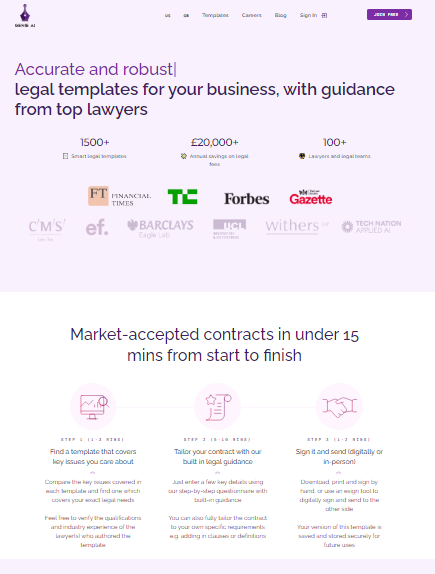
With guidance from top lawyers, legal templates for your business. In less than 15 minutes, you can create market-accepted contracts. Compare the key issues in each template to find one that meets your specific legal needs. You are welcome to verify the industry experience and qualifications of the lawyer(s), who created the template. Simply fill out a few details using our step by step questionnaire with built-in guidance. You can also customize the contract to meet your specific needs, e.g. You can add clauses or definitions to the contract. Print, sign, and then sign by hand. You can also use an esign tool to digitally sign the document and send it to the other side. This template can be saved to your computer and stored for future reference. Automate the creation of contracts using pre-built questionnaires. Create custom questionnaires to automate the drafting of your own templates. Our AI can automatically review legal contracts.
API Access
Has API
API Access
Has API


Pricing Details
No price information available.
Free Trial
Free Version
Pricing Details
$324.04 per month
Free Trial
Free Version
Deployment
Web-Based
On-Premises
iPhone App
iPad App
Android App
Windows
Mac
Linux
Chromebook
Deployment
Web-Based
On-Premises
iPhone App
iPad App
Android App
Windows
Mac
Linux
Chromebook
Customer Support
Business Hours
Live Rep (24/7)
Online Support
Customer Support
Business Hours
Live Rep (24/7)
Online Support
Types of Training
Training Docs
Webinars
Live Training (Online)
In Person
Types of Training
Training Docs
Webinars
Live Training (Online)
In Person
Vendor Details
Company Name
BoostDraft
Country
United States
Website
boostdraft.com
Vendor Details
Company Name
Genie AI
Country
United Kingdom
Website
www.genieai.co
Product Features
Product Features
Document Generation
Batch Processing
Collaboration
Digital Signature
Interaction Tracking
Multiple Output Formats
Templates



