Average Ratings 10 Ratings
Average Ratings 0 Ratings
Similar Products
-
Windsurf EditorWindsurf is a cutting-edge IDE designed for developers to maintain focus and productivity through AI-driven assistance. At the heart of the platform is Cascade, an intelligent agent that not only fixes bugs and errors but also anticipates potential issues before they arise. With built-in features for real-time code previews, automatic linting, and seamless integrations with popular tools like GitHub and Slack, Windsurf streamlines the development process. Developers can also benefit from memory tracking, which helps Cascade recall past work, and smart suggestions that enhance code optimization. Windsurf’s unique capabilities ensure that developers can work faster and smarter, reducing onboarding time and accelerating project delivery.
-
ParasoftParasoft's mission is to provide automated testing solutions and expertise that empower organizations to expedite delivery of safe and reliable software. A powerful unified C and C++ test automation solution for static analysis, unit testing and structural code coverage, Parasoft C/C++test helps satisfy compliance with industry functional safety and security requirements for embedded software systems.
-
DbVisualizerDbVisualizer is one of the world’s most popular database clients. Developers, analysts, and DBAs use it to advance their SQL experience with modern tools to visualize and manage their databases, schemas, objects, and table data and to auto-generate, write and optimize queries. It has extended support for 30+ of the major databases and has basic-level support for all databases that can be accessed with a JDBC driver. DbVisualizer runs on all major OSes. Free and Pro versions are available.
-
TinyPNGTinyPNG (by Tinify) is a free image optimization service built for developers and designers. It utilizes smart lossy compression to reduce the file sizes of JPEG, PNG, WebP, and AVIF files by up to 80% with no visible quality loss. That means faster load times, better SEO, and lower bandwidth. You can compress, convert, and resize images via a clean web interface or integrate it into your workflow with the API. The platform also provides an image CDN for fast global delivery of optimized assets. SDKs are available for Python, Node.js, PHP, Java, Ruby, and .NET. WordPress plugin included, plus plenty of community-driven integrations. No tuning, no noise, Tinify just works. Whether you're optimizing a handful of images or processing millions, it scales effortlessly. All plans include a generous free tier, and support is quick when you need it. George the panda 🐼 approves.
-
RetoolRetool is a modern AI-native application development platform designed to help teams build internal software quickly and efficiently. It enables users to create agents, workflows, dashboards, and full-stack apps using natural language prompts and visual tools. Retool connects directly to databases, APIs, vector stores, and AI models to ensure applications work seamlessly with existing systems. The platform allows teams to transform raw data into actionable tools such as dashboards, admin panels, and monitoring systems. With drag-and-drop UI building, code-level customization, and AI-assisted generation, Retool supports multiple development styles. Built-in workflows automate complex processes while maintaining auditability and security. Retool fits naturally into standard engineering stacks with support for CI/CD and version control. Enterprise-grade permissions and hosting options ensure sensitive data stays protected. Used by thousands of companies worldwide, Retool helps teams ship AI-powered software faster. It bridges the gap between idea and production with speed and control.
-
Google Cloud RunFully managed compute platform to deploy and scale containerized applications securely and quickly. You can write code in your favorite languages, including Go, Python, Java Ruby, Node.js and other languages. For a simple developer experience, we abstract away all infrastructure management. It is built upon the open standard Knative which allows for portability of your applications. You can write code the way you want by deploying any container that listens to events or requests. You can create applications in your preferred language with your favorite dependencies, tools, and deploy them within seconds. Cloud Run abstracts away all infrastructure management by automatically scaling up and down from zero almost instantaneously--depending on traffic. Cloud Run only charges for the resources you use. Cloud Run makes app development and deployment easier and more efficient. Cloud Run is fully integrated with Cloud Code and Cloud Build, Cloud Monitoring and Cloud Logging to provide a better developer experience.
-
My Member SoftwareMy Member Software is a frontend user-friendly member administration software that is open source and downloadable. Associations, Clubs and Foundations can manage their members. It is integrated into the CMS Joomla, but can also be used alongside a Wordpress and Drupal website. You can manage your members from anywhere, at any time. For a hassle-free setup, you can choose to have it done by yourself or with us. We are also interested in partnerships with webdesigners and accounting firms.
-
Source DefenseSource Defense is an essential element of web safety that protects data at the point where it is entered. Source Defense Platform is a simple, yet effective solution to data security and privacy compliance. It addresses threats and risks that arise from the increased use JavaScript, third party vendors, and open source code in your web properties. The Platform offers options for securing code as well as addressing an ubiquitous gap in managing third-party digital supply chains risk - controlling actions of third-party, forth-party and nth-party JavaScript that powers your website experience. Source Defense Platform provides protection against all types of client-side security incidents, including keylogging, formjacking and digital skimming. Magecart is also protected. - by extending the web security beyond the browser to the server.
-
Curtain LogTrace File Activity MonitoringIn the daily work environment, companies often need to authorize their employees to access and use sensitive company data. However, most companies lack visibility into how their employees are actually utilizing this data, and whether any misuse is occurring. At the same time, companies have to meet internal audit requirements and comply with various data security regulations and policies. This creates a need for the IT department to find ways to effectively monitor and record how employees are accessing and using the company’s data resources. Curtain LogTrace provides enterprise-wide file activity monitoring. It tracks user actions: create, copy, move, delete, rename, print, open, close, save. Includes source/destination paths and disk type. Perfect for monitoring user file activities. Key Features: - File log (create & delete file) - File log (copy & move file) - File log (print & rename file) - App log (save, open & close file) - Support MySQL & MS SQL - Watermark for printout - Central administration - Integration with Active Directory - Uninstall password for client - Password management - Admin delegation - Self protection for the software
-
ApifyApify provides the infrastructure developers need to build, deploy, and monetize web automation tools. The platform centers on Apify Store, a marketplace featuring 10,000+ community-built Actors. These are serverless programs that scrape websites, automate browser tasks, and power AI agents. Developers create Actors using JavaScript, Python, or Crawlee (Apify's open-source crawling library), then publish them to the Store. When other users run your Actor, you earn money. Apify manages the infrastructure, handles payments, and processes monthly payouts to thousands of active developers. Apify Store offers ready-to-use solutions for common use cases: extracting data from Amazon, Google Maps, and social platforms; monitoring prices; generating leads; and much more. Under the hood, Actors automatically manage proxy rotation, CAPTCHA solving, JavaScript-heavy pages, and headless browser orchestration. The platform scales on demand with 99.95% uptime and maintains SOC2, GDPR, and CCPA compliance. For workflow automation, Apify connects to Zapier, Make, n8n, and LangChain. The platform also offers an MCP server, enabling AI assistants like Claude to discover and invoke Actors programmatically.
Description
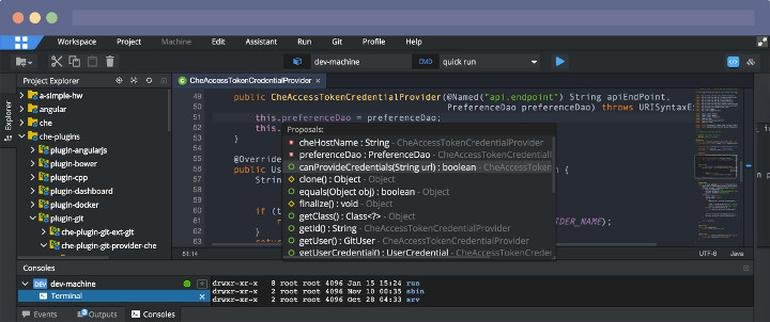
Eclipse IDE stands as the premier open platform tailored for professional developers engaged in computer programming, and it has never been better. This IDE provides essential tools to drive rapid innovation with a simplified configuration process, including the Eclipse IDE Installer 2020-09, which now incorporates a Java Runtime Environment (JRE) in several of its packages. The enhancements also extend to theming and styling, featuring an improved dark theme for Windows and a refined light theme for GTK. Additionally, Eclipse IDE has transitioned to require Java 11 as its minimum operating version while maintaining the ability to compile older versions as desired. Among its new experimental features is support for aarch64, along with robust Linux support that has been integrated into this version. Furthermore, Node.js is now embedded within all LSP-based tools, facilitating seamless functionality from the start. Eclipse IDE remains free and open source, distributed under the Eclipse Public License 2.0, underscoring its commitment to community-driven development. The platform thrives on an extensive ecosystem of plugins, bolstered by an active and engaged community of contributors. This collaborative environment ensures that Eclipse IDE continues to evolve and meet the diverse needs of developers worldwide.
Description
Utilize the leading Enterprise Resource Interoperability (ERI) platform in the industry to seamlessly integrate, analyze, and automate both rule-based and event-driven business processes within large-scale data sectors. The Metatomix ERI platform features the M3T4 Studio (M3), an adaptable JAVA platform built on Eclipse that harnesses data semantics to connect your organization’s most vital information. Unique in its capability, Metatomix M3 allows for the development of semantic data applications while providing a comprehensive solution anchored in Java’s Eclipse IDE. Rather than starting with a blank slate, take advantage of an extensive array of adaptable resources, including agents and ports, that come bundled with M3. Specifically designed to comprehend your data's semantics, M3 is equipped with functionalities that facilitate the description, inference drawing, and actionable insights from your diverse data sets, ensuring that you can effectively manage and utilize the vast amounts of information at your disposal. By leveraging these powerful features, businesses can achieve greater efficiency and insight, ultimately driving better decision-making processes.
API Access
Has API
API Access
Has API


Integrations
Azure DevOps Labs
Azure Marketplace
Betterscan.io
BullseyeCoverage
C
Code Time
CodeSonar
JavaScript
Jtest
Racket
Integrations
Azure DevOps Labs
Azure Marketplace
Betterscan.io
BullseyeCoverage
C
Code Time
CodeSonar
JavaScript
Jtest
Racket
Pricing Details
No price information available.
Free Trial
Free Version
Pricing Details
No price information available.
Free Trial
Free Version
Deployment
Web-Based
On-Premises
iPhone App
iPad App
Android App
Windows
Mac
Linux
Chromebook
Deployment
Web-Based
On-Premises
iPhone App
iPad App
Android App
Windows
Mac
Linux
Chromebook
Customer Support
Business Hours
Live Rep (24/7)
Online Support
Customer Support
Business Hours
Live Rep (24/7)
Online Support
Types of Training
Training Docs
Webinars
Live Training (Online)
In Person
Types of Training
Training Docs
Webinars
Live Training (Online)
In Person
Vendor Details
Company Name
Eclipse Foundation
Country
Canada
Website
www.eclipse.org/eclipseide/
Vendor Details
Company Name
Metatomix
Website
www.metatomix.com
Product Features
Application Development
Access Controls/Permissions
Code Assistance
Code Refactoring
Collaboration Tools
Compatibility Testing
Data Modeling
Debugging
Deployment Management
Graphical User Interface
Mobile Development
No-Code
Reporting/Analytics
Software Development
Source Control
Testing Management
Version Control
Web App Development
Code Editors
API
Auto-Complete
Code Folding
Column Editing
Customizable Themes
Debugging
Formatting / Table Editing
Keyboard Shortcuts
Multi-Monitor Editing
Syntax Highlighting
WYSIWYG
IDE
Code Completion
Compiler
Cross Platform Support
Debugger
Drag and Drop UI
Integrations and Plugins
Multi Language Support
Project Management
Text Editor / Code Editor
Product Features
Integration
Dashboard
ETL - Extract / Transform / Load
Metadata Management
Multiple Data Sources
Web Services

