Average Ratings 1 Rating
Average Ratings 0 Ratings
Similar Products
-
Secure EraserSecure Eraser: Secure Data Deletion, Shredders Your Files & Folders. Just because it has been removed from your hard drive doesn't mean that it is gone forever. Anyone can restore the information as long as it was not overwritten. It becomes more difficult if the computer has been resold, or given away. Secure Eraser employs the most well-known method of data disposal. It overwrites sensitive information so that it cannot be recovered even with specialized software. Our award-winning solutions for permanently destroying data eliminate cross-references that may leave traces of deleted files within the allocation table of your hard disk. This Windows software is easy to use and can overwrite sensitive data up to 35 times, regardless of whether they're files, folders or drives, recycle bins, or traces of surfing. You can also delete files that you have already deleted but not for good.
-
FilerevFilerev is a powerful tool that helps you easily find and manage hidden files, duplicate files, large files, and oversized folders, ensuring a streamlined and clutter-free digital workspace. Key features include advanced scanning technology that identifies the unorganized files taking up the most space and cluttering your Google Drive. Filerev enhances productivity by saving time and reducing the frustration of manual file organization. The custom filters and bulk delete tool give you complete control over finding and removing unwanted files in your account. The storage analyzer lets you browse your folders by size to see where the space is being used in your Google Drive. Whether you're an individual, a small business, or a large enterprise, Filerev offers robust solutions tailored to your needs. Visit filerev.com to discover how Filerev can transform your Google Drive experience and boost efficiency.
-
PDFCreatorPDFCreator is a powerful and versatile tool that enables you to convert any printable document into a PDF, along with various other formats such as JPG and PNG. Whether you're handling text documents, images, or presentations, PDFCreator makes it easy to streamline your workflow. Key features: Convert documents from any application to PDF, JPG, PNG, and more with ease. Merge multiple files into one PDF document, improving organization and accessibility. Set up automatic saving and create a fully automated PDF printer, saving time and reducing manual work. Access your most frequently used settings with just one click, making repetitive tasks faster and simpler. Simplify the process of converting, securing, and organizing your PDFs, with options for digital signatures, password protection, and more. New in PDFCreator 6.2.2: delivers important stability fixes, resolving setup crashes related to release notes, correcting preview issues that caused broken characters and blank pages, and fixing conversion problems from the Windows context menu. It also improves file handling by preventing unintended merging during conversions and includes minor updates to installer parameters and support settings. PDFCreator is trusted by countless businesses around the world to handle document conversion and management. We value every client and appreciate their trust in choosing PDFCreator as their go-to PDF solution. Whether you're a casual user or a business professional, PDFCreator offers a streamlined, flexible, and efficient solution for all your document needs. We thank all our clients for choosing us to be their partner.
-
BudgytYou know the pain. 8,000+ formulas in your Excel budget, any one of which could break. Department heads emailing versions back and forth. Mystery errors appearing right before board meetings. Weekends lost hunting for that one number that doesn't add up. We built Budgyt because we lived that nightmare as CFOs ourselves. It's a true database that works like Excel, so your team doesn't need training. But formulas never break. Every number traces back to source with one click. Import your chart of accounts and actuals directly from your accounting system. Click any variance to drill down to vendor-level detail instantly. Run rolling reforecasts every month without rebuilding everything from scratch. We connected it via API so you're up and running in hours, not spending months on implementation consulting. Built for multi-department organizations where budgeting needs to be collaborative, but the finance team needs to stay in control. No more emailing spreadsheets around. No more "did I break something?" panic. Just budgeting that actually works.
-
JetBrains JunieJetBrains Junie is an innovative AI coding assistant that works inside many JetBrains IDEs to streamline programming efforts and boost efficiency. This agent leverages advanced AI to help developers write, test, and inspect code without leaving their familiar development environment. Junie offers both code execution and interactive collaboration, allowing programmers to switch between automated code writing and brainstorming sessions for features and improvements. By deeply understanding the codebase, Junie identifies the best ways to tackle tasks and ensures all changes meet quality standards through syntax and semantic checks. It also runs tests to minimize errors and keep the project healthy, freeing developers from routine tasks. Many developers have successfully built complex applications and games using Junie, highlighting its flexibility across different languages and frameworks. The AI adapts to each task’s complexity and workflow, making coding less tedious and more focused on creativity. Whether you are building a simple web app or a complex game, Junie offers smart support throughout the development cycle.
-
Gemini Enterprise Agent PlatformGemini Enterprise Agent Platform is Google Cloud’s next-generation system for designing and managing advanced AI agents across the enterprise. Built as the successor to Vertex AI, it unifies model selection, development, and deployment into a single scalable environment. The platform supports a vast ecosystem of over 200 AI models, including Google’s latest Gemini innovations and popular third-party models. It offers flexible development tools like Agent Studio for visual workflows and the Agent Development Kit for deeper customization. Businesses can deploy agents that operate continuously, maintain long-term memory, and handle multi-step processes with high efficiency. Security and governance are central, with features such as agent identity verification, centralized registries, and controlled access through gateways. The platform also enables seamless integration with enterprise systems, allowing agents to interact with data, applications, and workflows securely. Advanced monitoring tools provide real-time insights into agent behavior and performance. Optimization features help refine agent logic and improve accuracy over time. By combining automation, intelligence, and governance, the platform helps organizations transition to autonomous, AI-driven operations. It ultimately supports faster innovation while maintaining enterprise-grade reliability and control.
-
CLEARThe CLEAR™ Cryptosystem is a FIPS-140-3 validated encryption SDK designed to secure files, streaming media, databases, and network communications with cutting-edge, programmable encryption technology. Fully compatible with all modern computing platforms, CLEAR™ provides a simple, turnkey solution for integrating advanced encryption into existing security systems. With Post-Quantum Cryptography (PQC) capabilities, it delivers future-proof protection against emerging cybersecurity threats, ensuring your data is secured with the strongest available encryption methods. Key Features: • PQC Encryption Strength ( 512bit - 10,240bit) • Ultra Low-Latency Streaming (< 11µs / Packet) • Hyperkey™ Technology with embedded ACL • Multi-Factor / Bio-Metric Symmetric Keys • Plug-N-Play Entropy - CSRNG, QRNG, HRNG Benefits: • Pass cybersecurity audits with best-in-class tools • Share data securely via Sharepoint, Dropbox, etc. • Protect legacy gear and outdated network equipment • Extend protection to files in 3rd party portals • Future lasting power - long-term data archival
-
Globalscape Enhanced File Transfer (EFT)Globalscape's Enhanced File Transfer platform (EFT) is a user-friendly managed file transfer software (MFT). Globalscape EFT is trusted by thousands of Windows-Centric Organizations for mission-critical file transfers. EFT offers security and compliance, as well as powerful tools for collaboration, automation, and analysis. It is available in cloud/SaaS EFT Arcus and on-premises EFT deployments. EFT, unlike traditional file transfer software, provides enterprise-level data security and data transfer automation through integration to back-end systems. EFT administration is simple, yet provides complete control over your file transfer system. EFT replaces insecure legacy systems and expensive leased lines with a high-performing, scalable alternative.
-
SOCRadar Extended Threat IntelligenceSOCRadar Extended Threat Intelligence is a holistic platform designed from the ground up to proactively detect and assess cyber threats, providing actionable insights with contextual relevance. Organizations increasingly require enhanced visibility into their publicly accessible assets and the vulnerabilities associated with them. Relying solely on External Attack Surface Management (EASM) solutions is inadequate for mitigating cyber risks; instead, these technologies should form part of a comprehensive enterprise vulnerability management framework. Companies are actively pursuing protection for their digital assets in every potential exposure area. The conventional focus on social media and the dark web no longer suffices, as threat actors continuously expand their methods of attack. Therefore, effective monitoring across diverse environments, including cloud storage and the dark web, is essential for empowering security teams. Additionally, for a thorough approach to Digital Risk Protection, it is crucial to incorporate services such as site takedown and automated remediation. This multifaceted strategy ensures that organizations remain resilient against the evolving landscape of cyber threats.
-
Google Compute EngineCompute Engine (IaaS), a platform from Google that allows organizations to create and manage cloud-based virtual machines, is an infrastructure as a services (IaaS). Computing infrastructure in predefined sizes or custom machine shapes to accelerate cloud transformation. General purpose machines (E2, N1,N2,N2D) offer a good compromise between price and performance. Compute optimized machines (C2) offer high-end performance vCPUs for compute-intensive workloads. Memory optimized (M2) systems offer the highest amount of memory and are ideal for in-memory database applications. Accelerator optimized machines (A2) are based on A100 GPUs, and are designed for high-demanding applications. Integrate Compute services with other Google Cloud Services, such as AI/ML or data analytics. Reservations can help you ensure that your applications will have the capacity needed as they scale. You can save money by running Compute using the sustained-use discount, and you can even save more when you use the committed-use discount.
Description
With just a single click, JetClean restores that invigorating, fresh PC experience! This lightweight and user-friendly tool effectively eliminates unwanted system junk files, enhancing your PC's overall performance. By cleaning out unnecessary files and irrelevant registry entries, it significantly boosts your computer’s efficiency with minimal effort. Despite occupying very little space on your device, JetClean provides comprehensive cleaning and optimization features in a dependable manner. It quickly identifies and removes junk files from locations such as the recycle bin, recent documents, temporary files, log files, clipboard, DNS cache, error reports, memory dumps, and jump lists. This results in improved PC performance for both work-related tasks and gaming sessions, making you feel like you have a brand-new computer again. Additionally, by safely removing outdated and unused registry entries, it decreases the likelihood of system errors and crashes. JetClean also enhances startup speed by reorganizing applications that launch at the same time as Windows, while it effectively terminates programs that could hinder your system's performance. Ultimately, JetClean is your go-to solution for maintaining an optimized and efficient computing experience.
Description
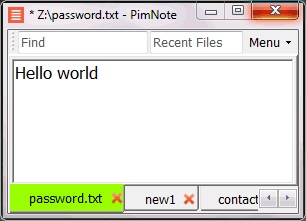
PimNote is a text editor that allows for faster document access. It also combines both the useful and unutilized features of all other text editors.
This tool is designed for knowledge management. You can quickly access the recent file list with a single click. You can easily access an old file that has been opened long ago with the unlimited and searchable recent files list. You can type less with the one-click search and find history feature.
This product is designed for remote work. No freezing from a remote file monitoring/opening/writing when disconnected. You can save files offline by closing the application and not closing the tabs. During file opening, auto-reconnect the network drive. Recurring file notifications are displayed politely on top bar, instead of a popup dialog box that requires frequent actions and tends not to be used.
API Access
Has API
API Access
Has API


Integrations
C#
Pricing Details
Free
Free Trial
Free Version
Pricing Details
No price information available.
Free Trial
Free Version
Deployment
Web-Based
On-Premises
iPhone App
iPad App
Android App
Windows
Mac
Linux
Chromebook
Deployment
Web-Based
On-Premises
iPhone App
iPad App
Android App
Windows
Mac
Linux
Chromebook
Customer Support
Business Hours
Live Rep (24/7)
Online Support
Customer Support
Business Hours
Live Rep (24/7)
Online Support
Types of Training
Training Docs
Webinars
Live Training (Online)
In Person
Types of Training
Training Docs
Webinars
Live Training (Online)
In Person
Vendor Details
Company Name
BlueSprig
Country
United States
Website
www.bluesprig.com/jetclean.html
Vendor Details
Company Name
Pimtel
Founded
2018
Website
www.pimtel.com/pimnote/
Product Features
Product Features
Text Editors
API
Auto-Complete
Code Folding
Column Editing
Customizable Themes
Debugging
Formatting / Table Editing
Keyboard Shortcuts
Multi-Monitor Editing
Syntax Highlighting
WYSIWYG

